
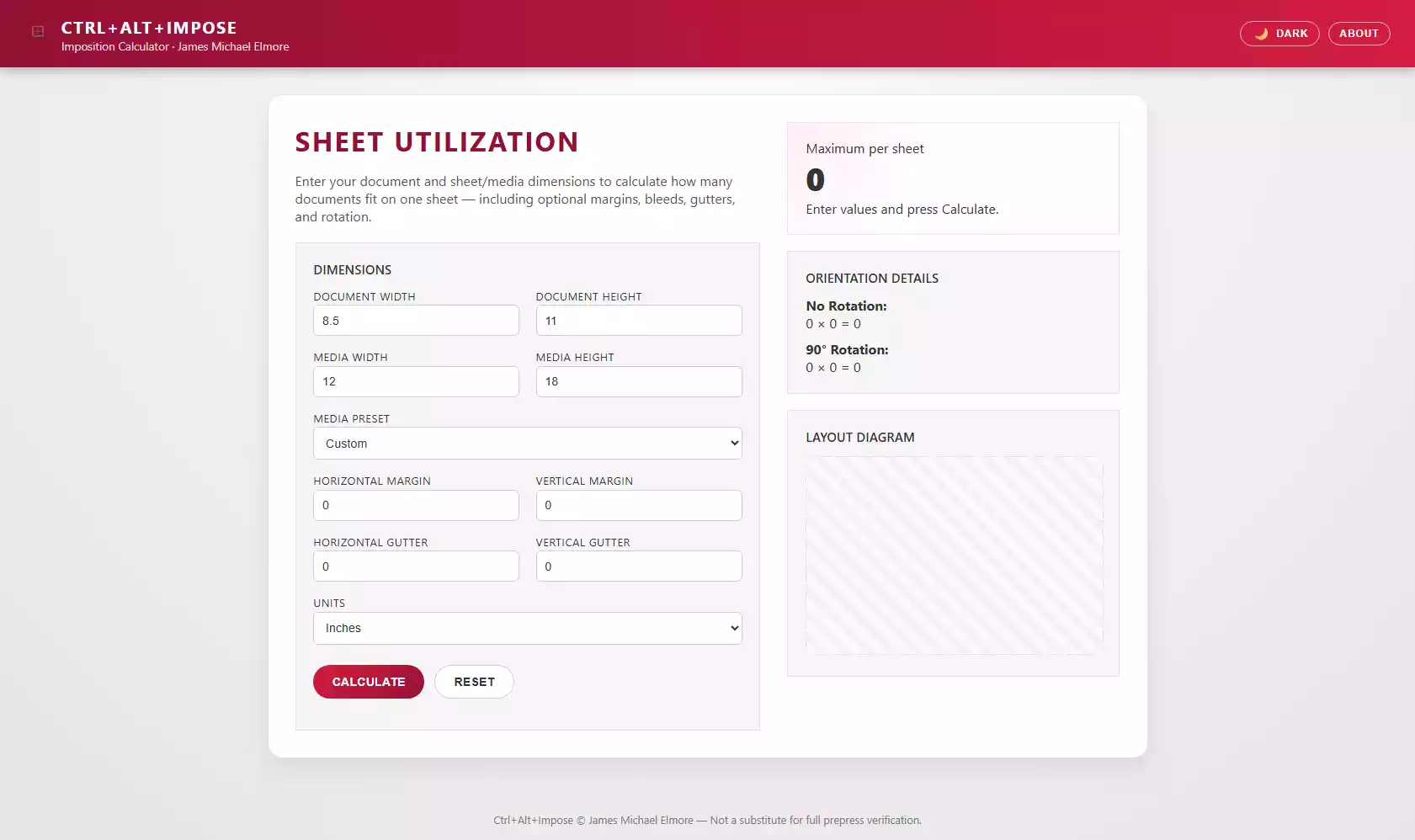
In professional print environments, efficiency is everything—especially when planning how many document pages can be imposed onto a larger sheet of media. Whether preparing marketing materials, booklets, or multi-up static documents, knowing your maximum yield per sheet directly impacts cost, production time, and waste reduction.
Ctrl+Alt+Impose was built to solve this need. Designed as a lightweight, browser-based imposition estimator, the tool provides fast calculations and a visual diagram of how many pages fit on a chosen sheet—respecting margins, bleeds, gutters, and even rotation. It is ideal for production staff, prepress trainees, and quick shop-floor checks before formal imposition in RIP or imposition software.
This article walks through the architecture of the tool, explains why each part matters, and isolates key logic from the code so developers can follow or extend it.
Source file reference:
1. The Purpose of Ctrl+Alt+Impose
Traditional imposition tools are powerful but can be:
- Slow to access
- Locked behind licensing
- Overkill for quick estimates
- Challenging for new employees
This tool removes those barriers. Users simply enter document dimensions and sheet dimensions to instantly see:
- Maximum pieces per sheet (standard vs. rotated orientation)
- A color-coded layout diagram
- Rows × columns breakdown
- Effects of margin and gutter adjustments in real time
Its goal is not to replace prepress software but to bridge the knowledge gap and support fast decision-making.
2. The Interface & User Experience
The tool opens with a branded splash screen and transitions into a crisp Ricoh-styled interface. The layout uses two main columns:
- Left: Input fields for dimensions and settings
- Right: Results, orientation breakdown, and a visual layout diagram
Inputs include:
- Document width & height
- Media width & height
- Optional presets such as 8.5×11, 11×17, and 12×18
- Margins and gutters
- Unit selection
- Live dark/light mode switching
This UI is powered entirely by HTML, CSS, and vanilla JavaScript—no frameworks required.
3. Core Calculation Logic
The heart of the tool is the calculate() function. This function determines how many documents fit across and down the sheet, both unrotated and rotated 90 degrees.
Key Snippet: Imposition Calculation Function
function calculate(docW, docH, mediaW, mediaH, marginH, marginV, gutterH, gutterV) {
  function perAxis(mediaSize, docSize, margin, gutter) {
    const effective = mediaSize - margin * 2;
    if (effective <= 0) return 0;
    return Math.max(0,
      Math.floor((effective + gutter) / (docSize + gutter))
    );
  }

  const across = perAxis(mediaW, docW, marginH, gutterH);
  const down   = perAxis(mediaH, docH, marginV, gutterV);
  const normal = across * down;

  const acrossR = perAxis(mediaW, docH, marginH, gutterH);
  const downR   = perAxis(mediaH, docW, marginV, gutterV);
  const rotated = acrossR * downR;

  return { normal, rotated, across, down, acrossR, downR };
}
Why This Matters
This calculation method mirrors the logic used in professional imposition software:
- Margins are subtracted from total sheet size to form the usable “safe area.”
- Gutters are factored between documents to account for cut tolerances.
- Rotation is evaluated separately to ensure the tool always surfaces the best possible yield.
- The function returns both orientations and the raw grid values, used later in the UI.
This snippet demonstrates clean modularity—each axis calculation is reusable and unit-independent.
4. Input Handling and Validation
User input is cleaned and validated using a helper function that ensures:
- Values are numeric
- Zero is only allowed where appropriate
- Negative or missing inputs are rejected
Key Snippet: Input Validation
function val(id, allowZero = false) {
  const n = parseFloat(document.getElementById(id).value);
  if (isNaN(n)) return null;
  if (!allowZero && n <= 0) return null;
  if (allowZero && n < 0) return null;
  return n;
}
Why This Matters
Print calculations rely on exact numbers—invalid inputs can easily cascade into incorrect imposition counts. This function ensures the tool fails safely and alerts the user.
5. Visual Layout Diagram
One of the most powerful features is the canvas-based visualization showing how many documents fit on the sheet. The tool draws:
- The full sheet
- The usable safe area
- Each imposed document (in rotated or normal orientation)
- Gutter spacing
- Margin boundaries
Key Snippet: Drawing the Layout
const scale = Math.min(
  (canvas.width - padding*2) / mediaW,
  (canvas.height - padding*2) / mediaH
);

const sheetW = mediaW * scale;
const sheetH = mediaH * scale;
const startX = (canvas.width - sheetW) / 2;
const startY = (canvas.height - sheetH) / 2;

// Draw sheet and safe area
ctx.fillRect(startX, startY, sheetW, sheetH);
ctx.strokeRect(startX, startY, sheetW, sheetH);
Why This Matters
Scaling ensures any size of media fits cleanly on the fixed-size diagram canvas.
The dynamic rendering creates a real-world mental model of imposition, helping beginners understand:
- Why rotation sometimes improves yield
- How margins reduce available rows/columns
- What gutters actually do in a layout
This transforms a numerical result into intuitive visual feedback.
6. Orientation Summary & Best-Case Selection
After computing both orientations, the tool compares them:
const best = Math.max(data.normal, data.rotated);
resultCount.textContent = best;

const orient = (data.rotated > data.normal) ? "rotated" : "normal";
drawDiagram(orient, data, ...);
Why This Matters
The calculator always surfaces the optimal orientation, saving the user from manual experimentation.
7. User Experience Enhancements
Several thoughtful quality-of-life features set this tool apart:
Dark Mode with LocalStorage
const savedTheme = localStorage.getItem("ctrlAltImposeTheme") || "light";
applyTheme(savedTheme);
Splash Screen & Branding
A floating, animated branded splash establishes polish and professionalism.
About Modal
Quick documentation is available directly inside the app.
Preset Sheet Sizes
Ideal for U.S. commercial print shops.
Clear Reset Logic
Ensures new calculations start cleanly.
These touches enhance usability, adoption, and training value—key in fast-paced production environments.
8. Conclusion
Ctrl+Alt+Impose is a powerful example of how a lightweight, well-designed browser tool can support the specialized needs of print and production environments. By blending clean code, a professional UI, and practical features such as rotation handling and visual diagrams, it bridges the gap between quick estimates and formal prepress workflows.
This tool empowers:
- Production staff needing quick yield estimates
- Prepress trainees learning imposition theory
- Customer service teams validating order feasibility
- Anyone who needs fast, accurate sheet utilization metrics
And because it’s built entirely in HTML, CSS, and JavaScript, it can be extended, branded, or integrated into larger production tool suites.
<!--
====================================================
  TOOL NAME: Ctrl+Alt+Impose
  AUTHOR: James Michael Elmore
  VERSION: 1.6
  LAST UPDATED: 2025-11-24
  DESCRIPTION: Imposition calculator with splash,
  logo integration, dark mode, presets, margins,
  gutters, layout diagram, and about modal.
====================================================
-->

<!DOCTYPE html>
<html lang="en">
<head>
  <meta charset="UTF-8" />
  <title>Ctrl+Alt+Impose | Imposition Calculator</title>
  <meta name="viewport" content="width=device-width, initial-scale=1.0" />

  <style>
    :root {
      --ricoh-red: #d31d3e;
      --ricoh-dark-red: #931036;
      --ricoh-light-bg: #f5f5f5;
      --ricoh-mid-grey: #e0e0e0;
      --ricoh-dark-grey: #333333;
      --ricoh-border: #cccccc;
      --ricoh-focus: #fc3741;

      --bg-body: radial-gradient(circle at top, #ffffff 0, #f2f2f2 40%, #e6e6e6 100%);
      --bg-app: #ffffff;
      --bg-panel: var(--ricoh-light-bg);
      --bg-result: radial-gradient(circle at top left, #ffeef2, #ffffff 40%);
      --bg-footer: transparent;

      --text-main: #333333;
      --text-muted: #555555;
      --text-soft: #777777;

      --border-panel: var(--ricoh-mid-grey);
      --border-result: #ffd6df;
      --shadow-main: 0 12px 30px rgba(0, 0, 0, 0.08);
    }

    /* Dark mode overrides */
    body.dark-mode {
      --bg-body: radial-gradient(circle at top, #121212 0, #121212 40%, #050505 100%);
      --bg-app: #141414;
      --bg-panel: #1f1f1f;
      --bg-result: radial-gradient(circle at top left, #3a101b, #1a1a1a 40%);
      --bg-footer: #000000;

      --text-main: #f0f0f0;
      --text-muted: #d0d0d0;
      --text-soft: #aaaaaa;

      --border-panel: #3a3a3a;
      --border-result: #5b1b2e;
      --shadow-main: 0 18px 38px rgba(0, 0, 0, 0.7);
    }

    body {
      margin: 0;
      font-family: system-ui, sans-serif;
      background: var(--bg-body);
      min-height: 100vh;
      display: flex;
      flex-direction: column;
      color: var(--text-main);
    }

    body.no-scroll {
      overflow: hidden;
    }

    /* ======================================================
       SPLASH SCREEN
    ====================================================== */
    #splash-screen {
      position: fixed;
      inset: 0;
      background: radial-gradient(circle at top, #2a2a2a 0, #000000 70%);
      display: flex;
      align-items: center;
      justify-content: center;
      z-index: 100;
      transition: opacity 0.6s ease, visibility 0.6s ease;
      opacity: 1;
      visibility: visible;
    }
    #splash-screen.hidden {
      opacity: 0;
      visibility: hidden;
    }

    .splash-content {
      text-align: center;
      color: #fff;
      animation: floatUp 0.9s ease-out;
    }

    .splash-logo {
      max-width: 260px;
      width: 60vw;
      margin-bottom: 0.75rem;
      animation: pulseGlow 1.6s ease-in-out infinite alternate;
      filter: drop-shadow(0 10px 22px rgba(0,0,0,0.6));
    }

    .splash-title {
      font-size: 1.1rem;
      letter-spacing: 0.22em;
      text-transform: uppercase;
    }

    @keyframes floatUp {
      from { transform: translateY(18px); opacity: 0; }
      to   { transform: translateY(0); opacity: 1; }
    }

    @keyframes pulseGlow {
      from { transform: scale(1); filter: drop-shadow(0 10px 22px rgba(211,29,62,0.3)); }
      to   { transform: scale(1.04); filter: drop-shadow(0 14px 28px rgba(211,29,62,0.6)); }
    }

    /* ======================================================
       HEADER WITH LOGO + TOGGLES
    ====================================================== */
    header {
      background: linear-gradient(90deg, var(--ricoh-dark-red), var(--ricoh-red));
      color: #fff;
      padding: 1.1rem 1.8rem;
      display: flex;
      align-items: center;
      justify-content: space-between;
      position: sticky;
      top: 0;
      z-index: 10;
      box-shadow: 0 4px 12px rgba(0,0,0,0.25);
    }

    .brand {
      display: flex;
      align-items: center;
      gap: 0.75rem;
    }

    .header-logo {
      height: 32px;
      width: auto;
      display: block;
    }

    .brand-title {
      font-size: 1.25rem;
      font-weight: 700;
      letter-spacing: 0.08em;
      text-transform: uppercase;
    }

    .brand-subtitle {
      font-size: 0.85rem;
      opacity: 0.85;
    }

    .header-actions {
      display: flex;
      gap: 0.6rem;
      align-items: center;
    }

    .about-btn,
    .mode-toggle {
      background: transparent;
      padding: 0.4rem 0.8rem;
      border-radius: 999px;
      color: white;
      cursor: pointer;
      text-transform: uppercase;
      letter-spacing: 0.07em;
      font-size: 0.75rem;
      border: 1px solid rgba(255,255,255,0.7);
      display: inline-flex;
      align-items: center;
      gap: 0.4rem;
    }

    .about-btn:hover,
    .mode-toggle:hover {
      background: rgba(255,255,255,0.15);
    }

    .mode-toggle-icon {
      font-size: 1rem;
      line-height: 1;
    }

    /* ======================================================
       ABOUT MODAL
    ====================================================== */
    .modal-backdrop {
      position: fixed;
      inset: 0;
      background: rgba(0,0,0,0.45);
      display: none;
      align-items: center;
      justify-content: center;
      z-index: 50;
    }
    .modal-backdrop.open { display: flex; }

    .modal {
      background: #fff;
      border-radius: 16px;
      width: 90%;
      max-width: 420px;
      padding: 1.7rem;
      position: relative;
      box-shadow: var(--shadow-main);
      border: 1px solid var(--border-panel);
      color: #333;
    }

    body.dark-mode .modal {
      background: #1f1f1f;
      color: var(--text-main);
    }

    .modal-close {
      position: absolute;
      top: 0.6rem;
      right: 0.9rem;
      background: transparent;
      border: none;
      font-size: 1.2rem;
      cursor: pointer;
      color: #777;
    }

    body.dark-mode .modal-close {
      color: #bbbbbb;
    }

    .about-logo {
      max-width: 120px;
      width: 40%;
      display: block;
      margin: 0 auto 1rem;
      filter: drop-shadow(0 4px 10px rgba(0,0,0,0.25));
    }

    .modal-title {
      text-align: center;
      font-size: 1.1rem;
      letter-spacing: 0.1em;
      text-transform: uppercase;
      color: var(--ricoh-dark-red);
      margin-bottom: 1rem;
    }

    .modal-body,
    .modal-meta {
      text-align: center;
      font-size: 0.9rem;
      line-height: 1.45;
      color: inherit;
    }

    /* ======================================================
       MAIN CONTENT
    ====================================================== */

    main {
      flex: 1;
      display: flex;
      justify-content: center;
      padding: 2rem 1rem 3rem;
    }

    .app-shell {
      width: 100%;
      max-width: 980px;
      background: var(--bg-app);
      border-radius: 18px;
      padding: 2rem;
      display: grid;
      grid-template-columns: 1.4fr 1fr;
      gap: 2rem;
      box-shadow: var(--shadow-main);
      border: 1px solid var(--border-panel);
    }

    @media (max-width: 850px) {
      .app-shell { grid-template-columns: 1fr; }
    }

    h1 {
      margin: 0 0 0.5rem;
      color: var(--ricoh-dark-red);
      text-transform: uppercase;
      letter-spacing: 0.07em;
    }

    body.dark-mode h1 {
      color: #ff9fb7;
    }

    .lead { margin-bottom: 1.3rem; color: var(--text-muted); }

    .panel {
      background: var(--bg-panel);
      border-radius: var(--radius-lg);
      padding: 1.3rem;
      border: 1px solid var(--border-panel);
    }

    .panel-title {
      font-size: 0.95rem;
      text-transform: uppercase;
      font-weight: 600;
      margin-bottom: 0.8rem;
      color: var(--text-main);
    }

    form {
      display: grid;
      grid-template-columns: repeat(2,1fr);
      gap: 1rem 1.2rem;
    }

    @media (max-width: 600px) { form { grid-template-columns: 1fr; } }

    .field-group { display: flex; flex-direction: column; }

    .field-label {
      font-size: 0.8rem;
      text-transform: uppercase;
      color: var(--text-main);
      letter-spacing: 0.05em;
      margin-bottom: 0.15rem;
    }

    input[type="number"], select {
      padding: 0.6rem;
      border-radius: 6px;
      border: 1px solid var(--ricoh-border);
      font-size: 0.9rem;
      background: #ffffff;
      color: var(--text-main);
    }

    body.dark-mode input[type="number"],
    body.dark-mode select {
      background: #191919;
      border-color: #444;
      color: var(--text-main);
    }

    /* Buttons */
    button {
      border-radius: 999px;
      padding: 0.7rem 1.4rem;
      cursor: pointer;
      text-transform: uppercase;
      font-size: 0.9rem;
      font-weight: 600;
    }

    .btn-primary {
      background: linear-gradient(135deg, var(--ricoh-red), var(--ricoh-dark-red));
      border: none;
      color: #fff;
    }

    .btn-secondary {
      background: white;
      border: 1px solid var(--ricoh-border);
      color: var(--text-main);
    }

    body.dark-mode .btn-secondary {
      background: #1f1f1f;
      border-color: #555;
      color: var(--text-main);
    }

    .actions {
      grid-column: 1/-1;
      display: flex;
      gap: 0.75rem;
      margin-top: 0.5rem;
      flex-wrap: wrap;
    }

    /* Results panel */
    .result-panel { display: flex; flex-direction: column; gap: 1.2rem; }

    .result-main {
      background: var(--bg-result);
      padding: 1.2rem 1.3rem;
      border-radius: var(--radius-lg);
      border: 1px solid var(--border-result);
    }

    .result-count { font-size: 2.4rem; font-weight: 800; }

    #layout-canvas {
      width: 100%;
      max-height: 260px;
      border: 1px dashed var(--ricoh-mid-grey);
      border-radius: 10px;
      background: repeating-linear-gradient(
        45deg,
        #fafafa,
        #fafafa 10px,
        #f2f2f2 10px,
        #f2f2f2 20px
      );
    }

    body.dark-mode #layout-canvas {
      background: repeating-linear-gradient(
        45deg,
        #202020,
        #202020 10px,
        #252525 10px,
        #252525 20px
      );
      border-color: #555;
    }

    footer {
      text-align: center;
      padding: 1rem;
      color: var(--text-soft);
      font-size: 0.8rem;
      background: var(--bg-footer);
    }

  </style>
</head>

<body class="no-scroll">

  <!-- ======================================================
       SPLASH SCREEN
  ====================================================== -->
  <div id="splash-screen">
    <div class="splash-content">
      <img src="logo.webp" alt="Ctrl+Alt+Impose Logo" class="splash-logo" />
      <div class="splash-title">CTRL+ALT+IMPOSE</div>
    </div>
  </div>

  <!-- ======================================================
       HEADER
  ====================================================== -->
  <header>
    <div class="brand">
      <img src="logo.webp" class="header-logo" alt="Ctrl+Alt+Impose logo">
      <div>
        <div class="brand-title">Ctrl+Alt+Impose</div>
        <div class="brand-subtitle">Imposition Calculator · James Michael Elmore</div>
      </div>
    </div>

    <div class="header-actions">
      <button class="mode-toggle" id="mode-toggle" aria-pressed="false">
        <span class="mode-toggle-icon" id="mode-toggle-icon">🌙</span>
        <span id="mode-toggle-label">Dark</span>
      </button>
      <button class="about-btn" id="about-btn">About</button>
    </div>
  </header>

  <!-- ======================================================
       MAIN APPLICATION
  ====================================================== -->
  <main>
    <div class="app-shell">

      <!-- Left column -->
      <section>
        <h1>Sheet Utilization</h1>
        <p class="lead">
          Enter your document and sheet/media dimensions to calculate how many documents
          fit on one sheet — including optional margins, bleeds, gutters, and rotation.
        </p>

        <div class="panel">
          <div class="panel-title">Dimensions</div>

          <form id="imposition-form" novalidate>

            <div class="field-group">
              <label class="field-label" for="doc-width">Document Width</label>
              <input type="number" id="doc-width" step="0.01" value="8.5">
            </div>

            <div class="field-group">
              <label class="field-label" for="doc-height">Document Height</label>
              <input type="number" id="doc-height" step="0.01" value="11">
            </div>

            <div class="field-group">
              <label class="field-label" for="media-width">Media Width</label>
              <input type="number" id="media-width" step="0.01" value="12">
            </div>

            <div class="field-group">
              <label class="field-label" for="media-height">Media Height</label>
              <input type="number" id="media-height" step="0.01" value="18">
            </div>

            <div class="field-group" style="grid-column:1/-1;">
              <label class="field-label" for="media-preset">Media Preset</label>
              <select id="media-preset">
                <option value="custom" selected>Custom</option>
                <option value="8.5x11">8.5 × 11 (Letter)</option>
                <option value="11x17">11 × 17 (Tabloid)</option>
                <option value="12x18">12 × 18</option>
              </select>
            </div>

            <div class="field-group">
              <label class="field-label" for="margin-horizontal">Horizontal Margin</label>
              <input type="number" id="margin-horizontal" step="0.01" value="0">
            </div>

            <div class="field-group">
              <label class="field-label" for="margin-vertical">Vertical Margin</label>
              <input type="number" id="margin-vertical" step="0.01" value="0">
            </div>

            <div class="field-group">
              <label class="field-label" for="gutter-horizontal">Horizontal Gutter</label>
              <input type="number" id="gutter-horizontal" step="0.01" value="0">
            </div>

            <div class="field-group">
              <label class="field-label" for="gutter-vertical">Vertical Gutter</label>
              <input type="number" id="gutter-vertical" step="0.01" value="0">
            </div>

            <div class="field-group" style="grid-column:1/-1;">
              <label class="field-label" for="units">Units</label>
              <select id="units">
                <option value="inches">Inches</option>
                <option value="mm">Millimeters</option>
                <option value="cm">Centimeters</option>
              </select>
            </div>

            <div class="actions">
              <button class="btn-primary" type="submit">Calculate</button>
              <button class="btn-secondary" type="button" id="reset-btn">
                Reset
              </button>
            </div>

            <div id="error-message" style="color:#b00;font-size:0.85rem;"></div>

          </form>
        </div>
      </section>

      <!-- Right column -->
      <section class="result-panel">

        <div class="result-main">
          <div class="result-label">Maximum per sheet</div>
          <div class="result-count" id="result-count">0</div>
          <div id="result-caption">Enter values and press Calculate.</div>
        </div>

        <div class="panel">
          <div class="panel-title">Orientation Details</div>

          <div id="layout-normal-row">
            <strong>No Rotation:</strong>
            <div id="layout-normal-value">0 × 0 = 0</div>
          </div>

          <div id="layout-rotated-row" style="margin-top:0.6rem;">
            <strong>90° Rotation:</strong>
            <div id="layout-rotated-value">0 × 0 = 0</div>
          </div>
        </div>

        <div class="panel">
          <div class="panel-title">Layout Diagram</div>
          <canvas id="layout-canvas" width="480" height="320"></canvas>
        </div>

      </section>

    </div>
  </main>

  <footer>
    Ctrl+Alt+Impose © James Michael Elmore — Not a substitute for full prepress verification.
  </footer>

  <!-- ======================================================
       ABOUT MODAL
  ====================================================== -->
  <div class="modal-backdrop" id="about-modal">
    <div class="modal">
      <button class="modal-close" id="about-close">×</button>

      <img src="logo.webp" class="about-logo" alt="Ctrl+Alt+Impose logo">

      <h2 class="modal-title">About Ctrl+Alt+Impose</h2>

      <div class="modal-body">
        A lightweight imposition estimator designed for fast planning, sanity checks,
        training, and quick shop-floor calculations before formal prepress.
      </div>

      <div class="modal-meta">
        <strong>Author:</strong> James Michael Elmore<br>
        <strong>Version:</strong> 1.6<br>
        <strong>Purpose:</strong> Quickly determine safe imposition counts using basic sheet + document dimensions.
      </div>
    </div>
  </div>

  <!-- ======================================================
       JAVASCRIPT LOGIC
  ====================================================== -->
  <script>
    const splash = document.getElementById("splash-screen");
    const aboutBtn = document.getElementById("about-btn");
    const aboutModal = document.getElementById("about-modal");
    const aboutClose = document.getElementById("about-close");

    const modeToggle = document.getElementById("mode-toggle");
    const modeToggleIcon = document.getElementById("mode-toggle-icon");
    const modeToggleLabel = document.getElementById("mode-toggle-label");

    // ----------------- THEME HANDLING -----------------
    function applyTheme(theme) {
      if (theme === "dark") {
        document.body.classList.add("dark-mode");
        modeToggle.setAttribute("aria-pressed", "true");
        modeToggleIcon.textContent = "☀️";
        modeToggleLabel.textContent = "Light";
      } else {
        document.body.classList.remove("dark-mode");
        modeToggle.setAttribute("aria-pressed", "false");
        modeToggleIcon.textContent = "🌙";
        modeToggleLabel.textContent = "Dark";
      }
    }

    // Load saved theme
    const savedTheme = localStorage.getItem("ctrlAltImposeTheme") || "light";
    applyTheme(savedTheme);

    modeToggle.addEventListener("click", () => {
      const isDark = document.body.classList.contains("dark-mode");
      const newTheme = isDark ? "light" : "dark";
      applyTheme(newTheme);
      localStorage.setItem("ctrlAltImposeTheme", newTheme);
    });

    // ----------------- SPLASH FADE-OUT -----------------
    window.addEventListener("load", () => {
      setTimeout(() => {
        splash.classList.add("hidden");
        document.body.classList.remove("no-scroll");
      }, 1200);
    });

    // Click-to-skip
    splash.addEventListener("click", () => {
      splash.classList.add("hidden");
      document.body.classList.remove("no-scroll");
    });

    // ----------------- ABOUT MODAL -----------------
    aboutBtn.addEventListener("click", () => {
      aboutModal.classList.add("open");
    });

    aboutClose.addEventListener("click", () => {
      aboutModal.classList.remove("open");
    });

    aboutModal.addEventListener("click", (e) => {
      if (e.target === aboutModal) aboutModal.classList.remove("open");
    });

    document.addEventListener("keydown", (e) => {
      if (e.key === "Escape" && aboutModal.classList.contains("open")) {
        aboutModal.classList.remove("open");
      }
    });

    /* ======================================================
       IMPOSITION CALCULATOR LOGIC
    ====================================================== */

    const form = document.getElementById("imposition-form");
    const errorMsg = document.getElementById("error-message");

    const resultCount = document.getElementById("result-count");
    const resultCaption = document.getElementById("result-caption");

    const layoutNormalValue = document.getElementById("layout-normal-value");
    const layoutRotatedValue = document.getElementById("layout-rotated-value");

    const canvas = document.getElementById("layout-canvas");
    const ctx = canvas.getContext("2d");

    function val(id, allowZero = false) {
      const n = parseFloat(document.getElementById(id).value);
      if (isNaN(n)) return null;
      if (!allowZero && n <= 0) return null;
      if (allowZero && n < 0) return null;
      return n;
    }

    function calculate(docW, docH, mediaW, mediaH, marginH, marginV, gutterH, gutterV) {
      function perAxis(mediaSize, docSize, margin, gutter) {
        const effective = mediaSize - margin * 2;
        if (effective <= 0) return 0;
        return Math.max(0,
          Math.floor((effective + gutter) / (docSize + gutter))
        );
      }

      const across = perAxis(mediaW, docW, marginH, gutterH);
      const down   = perAxis(mediaH, docH, marginV, gutterV);
      const normal = across * down;

      const acrossR = perAxis(mediaW, docH, marginH, gutterH);
      const downR   = perAxis(mediaH, docW, marginV, gutterV);
      const rotated = acrossR * downR;

      return {
        normal,
        rotated,
        across, down,
        acrossR, downR
      };
    }

    function drawDiagram(bestOrientation, data, docW, docH, mediaW, mediaH, marginH, marginV, gutterH, gutterV) {
      ctx.clearRect(0,0,canvas.width,canvas.height);

      if (data.normal === 0 && data.rotated === 0) {
        ctx.fillStyle = "#aaa";
        ctx.textAlign = "center";
        ctx.textBaseline = "middle";
        ctx.font = "14px system-ui";
        ctx.fillText("No layout fits.", canvas.width/2, canvas.height/2);
        return;
      }

      const rotate = (bestOrientation === "rotated");
      const dw = rotate ? docH : docW;
      const dh = rotate ? docW : docH;
      const across = rotate ? data.acrossR : data.across;
      const down   = rotate ? data.downR   : data.down;

      const padding = 20;
      const scale = Math.min(
        (canvas.width - padding*2) / mediaW,
        (canvas.height - padding*2) / mediaH
      );

      const sheetW = mediaW * scale;
      const sheetH = mediaH * scale;
      const startX = (canvas.width - sheetW) / 2;
      const startY = (canvas.height - sheetH) / 2;

      // Sheet
      ctx.fillStyle = document.body.classList.contains("dark-mode") ? "#202020" : "#fafafa";
      ctx.strokeStyle = document.body.classList.contains("dark-mode") ? "#555" : "#ccc";
      ctx.lineWidth = 2;
      ctx.fillRect(startX, startY, sheetW, sheetH);
      ctx.strokeRect(startX, startY, sheetW, sheetH);

      // Safe area
      const safeX = startX + marginH * scale;
      const safeY = startY + marginV * scale;
      const safeW = (mediaW - marginH*2) * scale;
      const safeH = (mediaH - marginV*2) * scale;

      ctx.fillStyle = document.body.classList.contains("dark-mode") ? "#101010" : "#ffffff";
      ctx.strokeStyle = document.body.classList.contains("dark-mode") ? "#444" : "#ddd";
      ctx.lineWidth = 1.5;
      ctx.fillRect(safeX, safeY, safeW, safeH);
      ctx.strokeRect(safeX, safeY, safeW, safeH);

      // Docs
      const dwpx = dw * scale;
      const dhpx = dh * scale;
      const ghpx = gutterH * scale;
      const gvpx = gutterV * scale;

      ctx.fillStyle = "rgba(211,29,62,0.35)";
      ctx.strokeStyle = "#d31d3e";
      ctx.lineWidth = 1;

      for (let r = 0; r < down; r++) {
        for (let c = 0; c < across; c++) {
          const x = safeX + c * (dwpx + ghpx);
          const y = safeY + r * (dhpx + gvpx);
          ctx.fillRect(x, y, dwpx, dhpx);
          ctx.strokeRect(x, y, dwpx, dhpx);
        }
      }
    }

    form.addEventListener("submit", (e) => {
      e.preventDefault();
      errorMsg.textContent = "";

      const docW = val("doc-width");
      const docH = val("doc-height");
      const mediaW = val("media-width");
      const mediaH = val("media-height");

      const marginH = val("margin-horizontal", true);
      const marginV = val("margin-vertical", true);
      const gutterH = val("gutter-horizontal", true);
      const gutterV = val("gutter-vertical", true);

      if ([docW,docH,mediaW,mediaH,marginH,marginV,gutterH,gutterV].includes(null)) {
        errorMsg.textContent = "Invalid input detected. Check all fields.";
        return;
      }

      const data = calculate(docW, docH, mediaW, mediaH, marginH, marginV, gutterH, gutterV);

      layoutNormalValue.textContent = `${data.across} × ${data.down} = ${data.normal}`;
      layoutRotatedValue.textContent = `${data.acrossR} × ${data.downR} = ${data.rotated}`;

      const best = Math.max(data.normal, data.rotated);
      resultCount.textContent = best;
      resultCaption.textContent = best === 0
        ? "With these settings, no documents fit. Try adjusting sizes or margins."
        : "Maximum documents per sheet using the better of the two orientations above.";

      const orient = (data.rotated > data.normal) ? "rotated" : "normal";

      drawDiagram(orient, data, docW, docH, mediaW, mediaH, marginH, marginV, gutterH, gutterV);
    });

    document.getElementById("reset-btn").addEventListener("click", () => {
      form.reset();
      document.getElementById("doc-width").value = 8.5;
      document.getElementById("doc-height").value = 11;
      document.getElementById("media-width").value = 12;
      document.getElementById("media-height").value = 18;

      resultCount.textContent = "0";
      resultCaption.textContent = "Enter values and press Calculate.";
      layoutNormalValue.textContent = "0 × 0 = 0";
      layoutRotatedValue.textContent = "0 × 0 = 0";
      ctx.clearRect(0,0,canvas.width,canvas.height);
    });

    // Media presets
    document.getElementById("media-preset").addEventListener("change", function () {
      const mw = document.getElementById("media-width");
      const mh = document.getElementById("media-height");
      if (this.value === "8.5x11") { mw.value=8.5; mh.value=11; }
      if (this.value === "11x17") { mw.value=11; mh.value=17; }
      if (this.value === "12x18") { mw.value=12; mh.value=18; }
    });

  </script>

</body>
</html>